 kmShare
Share one keyboard and mouse between Mac and Windows — and an image clipboard that actually works
Move the pointer off the edge of one screen and it appears on the other. Type there. Copy a screenshot on one machine and paste it on the other — the case free alternatives have been failing at for years.
K keyboard + M mouse — shared. That is the whole name.
Why the image clipboard is the whole point
Sharing a keyboard between two computers is a solved problem. Sharing a clipboard with images in both directions is not — and it is the thing you notice missing ten times a day.
| kmShare | Deskflow / Barrier | Duet | |
|---|---|---|---|
| Keyboard and mouse across machines | Yes | Yes | Paid tier |
| Text clipboard | Yes | Yes | Not listed |
| Image clipboard, both directions | Yes | Long-standing bugs | Not listed |
| Encrypted connection | Yes | Varies by build | Yes |
| Works offline, no account | Yes | Yes | Account required |
| Price | 7 days free, then US$ 9.99 once | Free | Subscription |
Deskflow is good software and it is free — if a text-only clipboard is enough for you, use it. kmShare exists for the case where it is not.
How to share a keyboard between a Mac and a PC
No IP addresses to look up, no configuration files to edit, no accounts to create.
- Install on both machinesmacOS and Windows. Open it — there is no service to start by hand.
- Say what each one doesOne has the keyboard and mouse. The other is controlled.
- Type a six digit codeShown on one machine, typed on the other. The address is found on your network automatically.
- Push the pointer off the edgeIt appears on the other screen, and the keyboard follows it.
The controlled machine asks one thing
No address to type, no settings to understand. Whoever sits at the other desk sees a field and a button.

What kmShare does
Encrypted end to end
Noise protocol with ChaCha20-Poly1305. Everything you type crosses encrypted, and the key never travels over the wire.
Nothing leaves your network
The two machines talk directly. No server of ours in the middle, no account, and nothing collected.
Either direction
The Mac can drive the PC or the PC can drive the Mac. Cmd and Ctrl swap automatically so your muscle memory survives.
Pointer speed matching
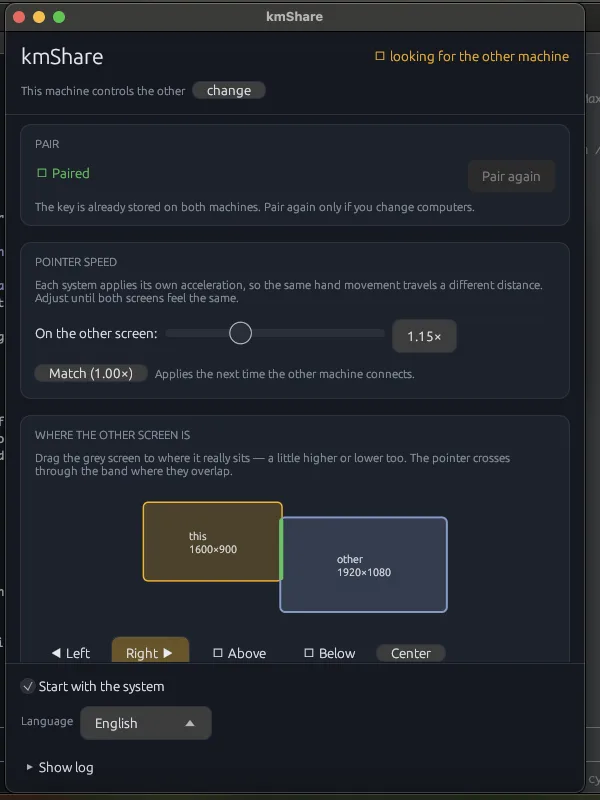
Each system applies its own acceleration. A slider makes the two screens feel like one desk instead of two.
Screens where they really are
Drag the second screen a little higher or lower. The pointer crosses only through the band where they overlap.
Starts with your session
Set it once. It comes back every time you log in, without a window in your face.
Download and start the free week
Install it on both machines — you need both. Nothing to sign up for, no card, nothing to cancel.
Windows
Windows 10 1809 or later · 64-bit
Download for WindowsInstalls per user — no administrator prompt.
The trial runs for seven days from the moment you open it. When the week is up the app says so, and a licence is one payment away.
Seven days free, then US$ 9.99 once
Install it and use it for a week before deciding — no card, no account. If you keep it, one payment covers both of your machines forever. If it does not work out after buying, write within 30 days and I refund it.
Questions people ask
Can I copy and paste images between Mac and Windows?
Yes, in both directions — screenshots, copied images and plain text. This is the case that breaks most often in Barrier and Deskflow, so it is the first thing kmShare was built to get right.
How do I share one keyboard and mouse between two computers?
Install kmShare on both, say which one has the keyboard, and type a six digit code on the other. Then push the pointer off the edge of the screen — it crosses to the second machine and the keyboard follows it.
How does the free trial work?
Install on both machines and use kmShare for seven days — no card, no account, nothing to cancel. When the week is up the app says so and points you here.
Is this remote desktop?
No. No video is transmitted. Both machines need their own screens in front of you. kmShare moves input and clipboard, not pixels — a few kilobytes per second instead of megabits.
Do I need an internet connection?
Only once, to activate. The two machines then talk directly over your local network, and kmShare keeps working with the internet down.
Is it a good Synergy or Barrier alternative?
That is what it was built for. Synergy is paid and Barrier is unmaintained; Deskflow continues Barrier and is good, but the image clipboard is still the weak spot. If you only need text, Deskflow is free and enough.
Will Windows warn me when I install it?
Only if you download the installer directly. From the Microsoft Store there is no warning, because Microsoft signs the package. On the Mac there is never a warning: the app is signed and notarized by Apple.
Why is kmShare not on the Mac App Store?
App Store apps must run sandboxed, and a sandboxed app cannot use the macOS Accessibility APIs required to move a keyboard and mouse. Karabiner, BetterTouchTool, Hammerspoon and Deskflow are all distributed directly for the same reason.